> ## Documentation Index
> Fetch the complete documentation index at: https://docs.mayar.id/llms.txt
> Use this file to discover all available pages before exploring further.
# Membership (Credit)
> Boost your software sales efficiency with Mayar’s flexible and easy-to-manage credit-based membership system!
### Overview
The credit-based membership system in Mayar lets you sell software with a monthly credit system. Credits can either reset or roll over at the end of each billing cycle, and members can top up credits during their subscription. You can set the price per credit and define minimum and maximum top-up limits. The system prioritizes the use of membership credits before add-on credits, and older credits are used first. Credits do not transfer if a member switches tiers. An API is available to manage credits, including registering new members with trial credits. Webhooks are also enabled for notifications of the first purchase and top-ups, giving you full flexibility and control over membership management on Mayar.
### How to Create a Credit-Based Membership Product
Log in to your account and go to the main dashboard.
Find and click the “Products” button at the top right, next to the “Create” button.
When the creation menu appears, choose “Membership & SaaS.” A new window titled Create Membership will open.
Enter the following information:
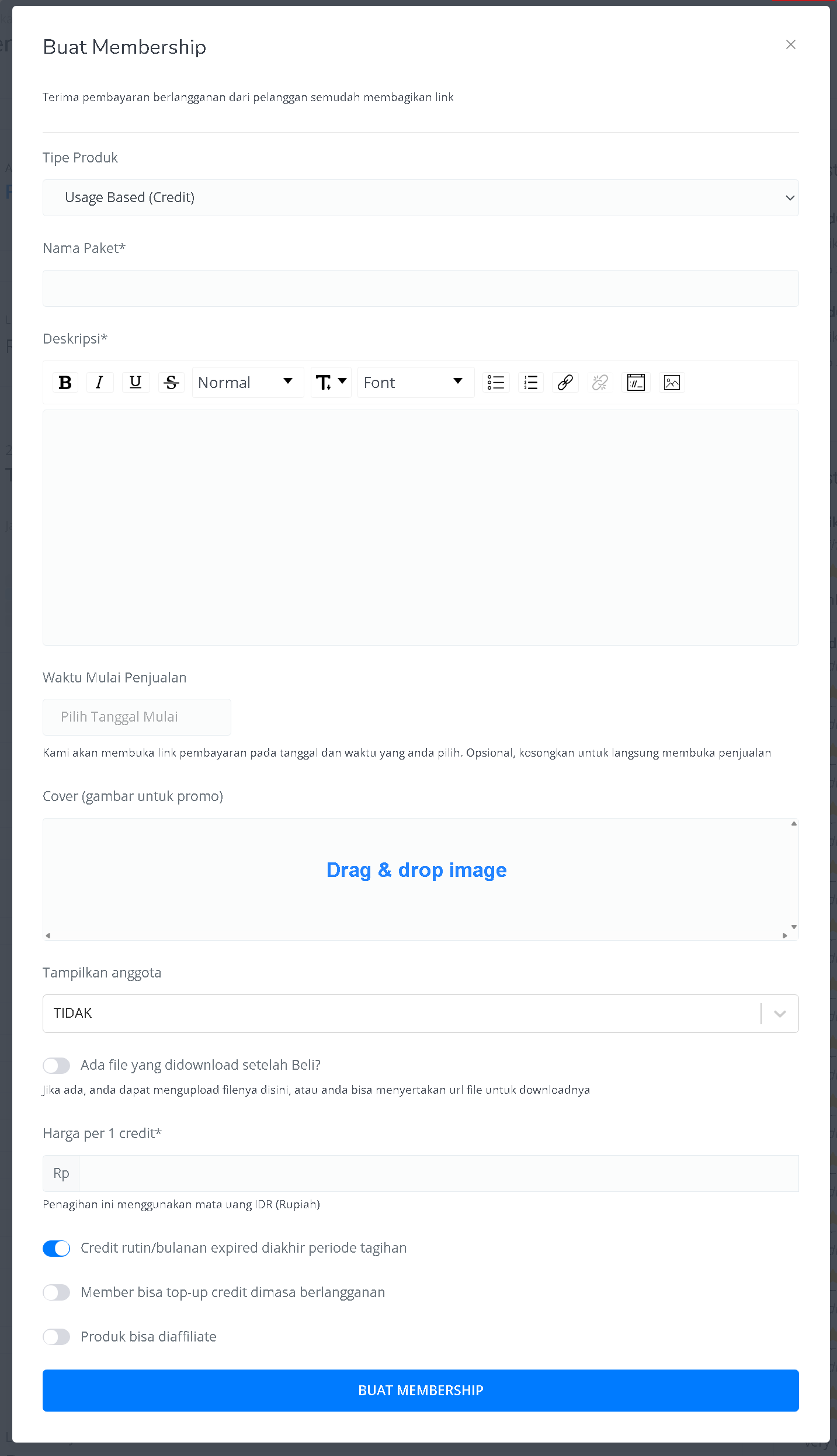 | **Input Form** | **Description** |
| ------------------------------------------ | -------------------------------------------------------------------------------------- |
| **Product Type** | Select “Usage-Based (credit).” |
| **Package Name** | Enter the membership package name. |
| **Description** | Add package details with a text editor (bold, italic, underline, etc.). |
| **Sales Start Date** | Choose a start date and time (optional, can be left blank for immediate availability). |
| **Cover Image** | Upload a promotional image (drag & drop). |
| **Show Members** | Decide whether to display member count publicly. |
| **Downloadable File After Purchase?** | Upload a file or include a URL (optional). |
| **Price per Credit** | Set the credit price in IDR. |
| **Credit Expiry at End of Billing Period** | Choose whether monthly credits expire at the end of each cycle. |
| **Allow Credit Top-Up** | Decide if members can top up during the subscription. |
| **Affiliate Option** | Allow or disallow this product to be part of an affiliate program. |
| **Create Membership Button** | Submit the form to create your membership product. |
Once created, you’ll be redirected to the membership product detail page showing information like:
| **Input Form** | **Description** |
| ------------------------------------------ | -------------------------------------------------------------------------------------- |
| **Product Type** | Select “Usage-Based (credit).” |
| **Package Name** | Enter the membership package name. |
| **Description** | Add package details with a text editor (bold, italic, underline, etc.). |
| **Sales Start Date** | Choose a start date and time (optional, can be left blank for immediate availability). |
| **Cover Image** | Upload a promotional image (drag & drop). |
| **Show Members** | Decide whether to display member count publicly. |
| **Downloadable File After Purchase?** | Upload a file or include a URL (optional). |
| **Price per Credit** | Set the credit price in IDR. |
| **Credit Expiry at End of Billing Period** | Choose whether monthly credits expire at the end of each cycle. |
| **Allow Credit Top-Up** | Decide if members can top up during the subscription. |
| **Affiliate Option** | Allow or disallow this product to be part of an affiliate program. |
| **Create Membership Button** | Submit the form to create your membership product. |
Once created, you’ll be redirected to the membership product detail page showing information like:
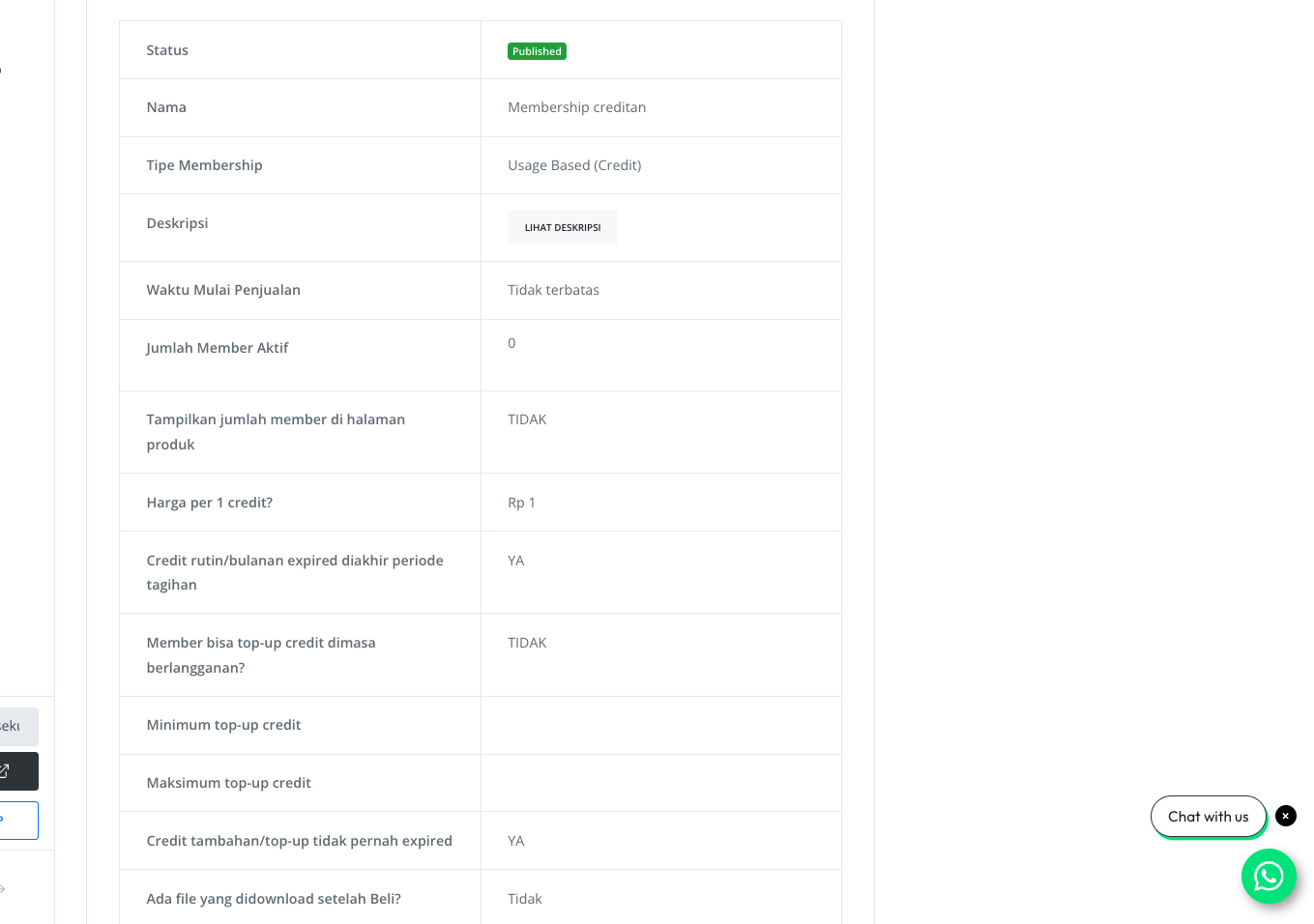 | **Information** | **Description** |
| ------------------------- | -------------------------------------------- |
| **Status** | Published and available. |
| **Name** | e.g., “Membership Credits.” |
| **Type** | Usage-based membership with a credit system. |
| **Description** | Expandable product description. |
| **Sales Start Date** | Available indefinitely. |
| **Active Members Count** | Currently none. |
| **Display Member Count** | isabled (not shown publicly). |
| **Price per Credit** | Rp 1. |
| **Monthly Credit Expiry** | Credits expire at the end of each cycle. |
| **Top-Up Availability** | Not allowed. |
| **Min/Max Top-Up** | Not set. |
| **Extra Top-Up Credits** | Never expire. |
| **Downloadable File** | None provided. |
Click Create Tier / Level / Package Membership above the “Membership Tier” table.
Provide tier information such as:
| **Information** | **Description** |
| ------------------------- | -------------------------------------------- |
| **Status** | Published and available. |
| **Name** | e.g., “Membership Credits.” |
| **Type** | Usage-based membership with a credit system. |
| **Description** | Expandable product description. |
| **Sales Start Date** | Available indefinitely. |
| **Active Members Count** | Currently none. |
| **Display Member Count** | isabled (not shown publicly). |
| **Price per Credit** | Rp 1. |
| **Monthly Credit Expiry** | Credits expire at the end of each cycle. |
| **Top-Up Availability** | Not allowed. |
| **Min/Max Top-Up** | Not set. |
| **Extra Top-Up Credits** | Never expire. |
| **Downloadable File** | None provided. |
Click Create Tier / Level / Package Membership above the “Membership Tier” table.
Provide tier information such as:
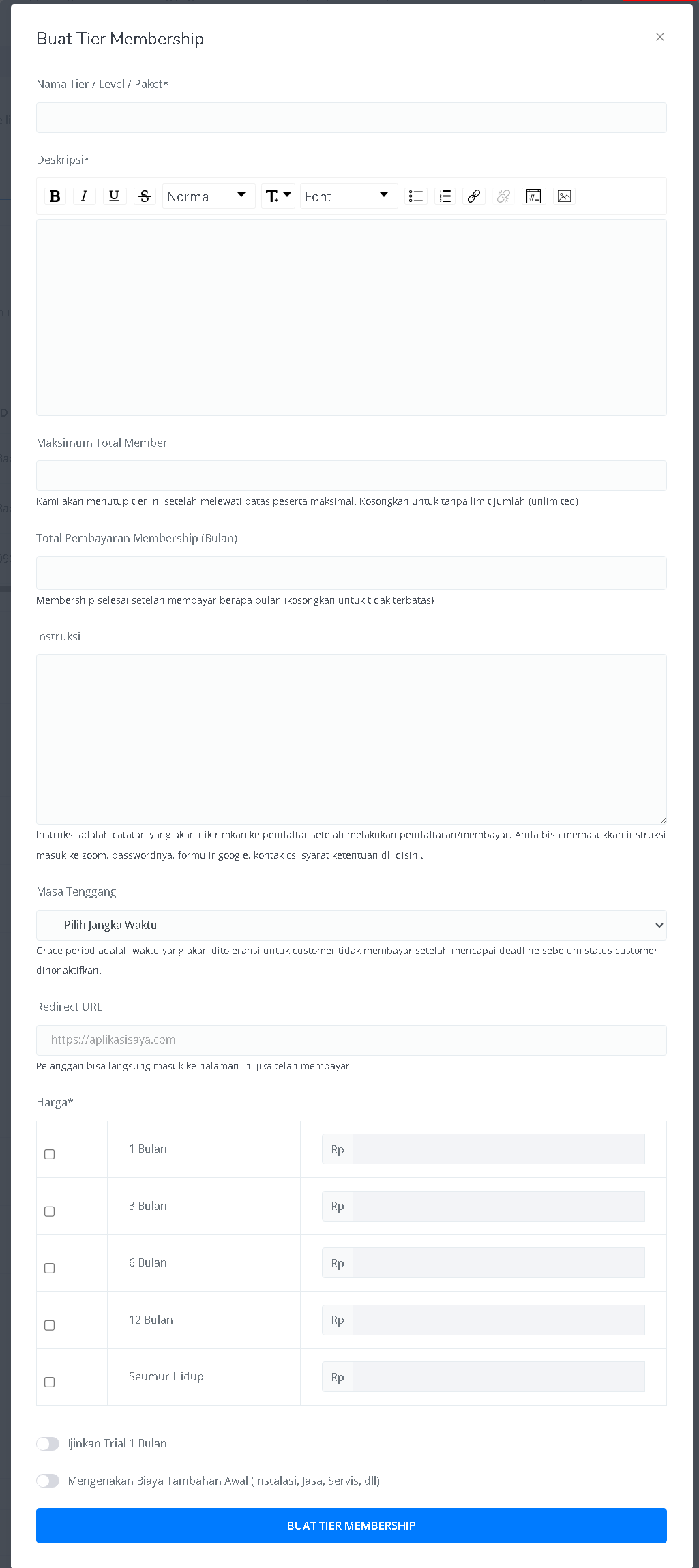 | **Input Form** | **Description** |
| -------------------------------- | ------------------------------------------------------------- |
| **Tier Name** | Enter tier/level/package name. |
| **Description** | Add tier details (with text editor options). |
| **Membership Duration (Months)** | Set a limit or leave blank for unlimited. |
| **Instructions** | Define billing period or leave blank for unlimited. |
| **Grace Period** | Notes or instructions for members after payment. |
| **Redirect URL** | Add a URL for redirection after successful payment. |
| **Pricing Table** | Define price and credits for 1, 3, 6, 12 months, or lifetime. |
| **Trial Option** | Enable a 1-month free trial. |
| **Additional Upfront Fee** | Add setup, service, or installation fees if needed. |
| **Create Tier Button** | Click to finalize and create the membership tier. |
Once tiers and the product are created, your membership credit product is ready to use on Mayar!
### How to Access the Product Page and Checkout
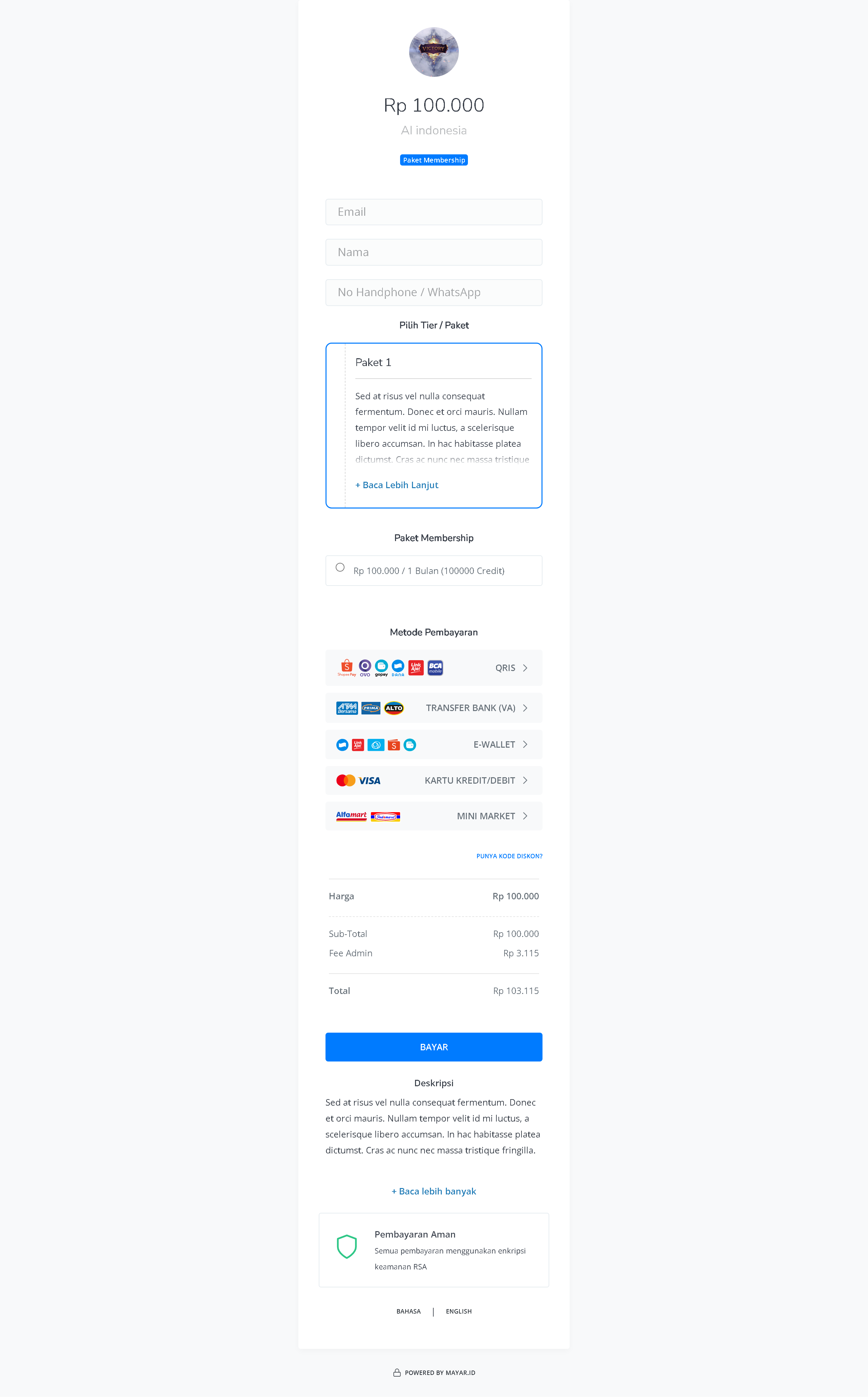
You can access the product page through the link provided in the product details.
| **Input Form** | **Description** |
| -------------------------------- | ------------------------------------------------------------- |
| **Tier Name** | Enter tier/level/package name. |
| **Description** | Add tier details (with text editor options). |
| **Membership Duration (Months)** | Set a limit or leave blank for unlimited. |
| **Instructions** | Define billing period or leave blank for unlimited. |
| **Grace Period** | Notes or instructions for members after payment. |
| **Redirect URL** | Add a URL for redirection after successful payment. |
| **Pricing Table** | Define price and credits for 1, 3, 6, 12 months, or lifetime. |
| **Trial Option** | Enable a 1-month free trial. |
| **Additional Upfront Fee** | Add setup, service, or installation fees if needed. |
| **Create Tier Button** | Click to finalize and create the membership tier. |
Once tiers and the product are created, your membership credit product is ready to use on Mayar!
### How to Access the Product Page and Checkout
You can access the product page through the link provided in the product details.
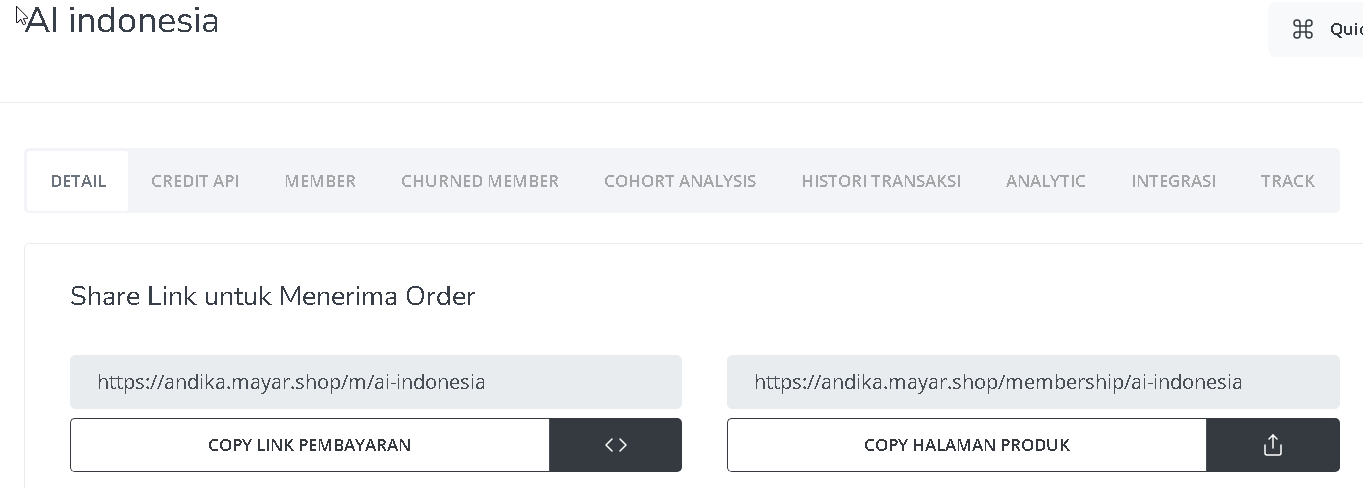 You can also access the product page by copying the product page link.
 To access the checkout page, you can copy the payment link.