> ## Documentation Index
> Fetch the complete documentation index at: https://docs.mayar.id/llms.txt
> Use this file to discover all available pages before exploring further.
# License Software
> Try our latest Software License feature to boost your efficiency and productivity today!
### Overview
Our Software License product offers powerful features designed to simplify the management of your software licenses. With an intuitive interface, you can easily track license usage in real time, ensure compliance with regulations, and optimize operational costs. Our automation features allow for seamless license renewal and maintenance, while the integrated reporting system provides in-depth insights into software usage across your organization. With top-level security and responsive customer support, our Software License is a trusted solution for all your license management needs.
### Creating a Software License Product
First, log in to your Mayar Dashboard. Make sure you are signed in to your account and on the main Dashboard page. Here, you will begin the process of creating a Software License product.
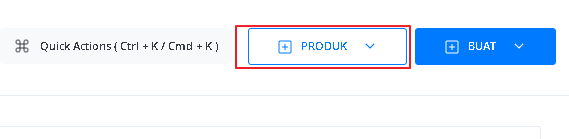
On the Dashboard page, find and click the "Product" button located at the top right corner, next to the “Create” button. This will take you to the product menu, where you can choose the type of product you want to create.
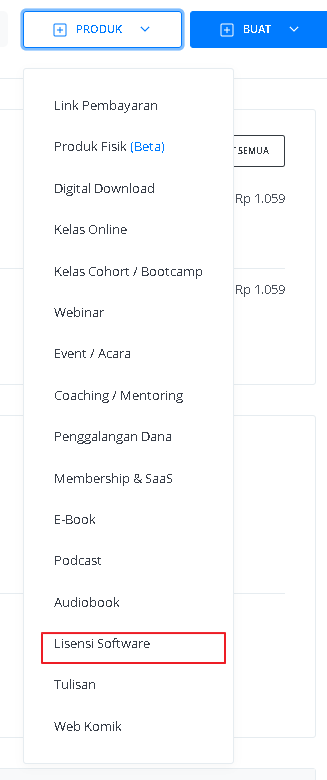
 From the product menu, select the “Software License” option to start creating your Software License product. This will open a new window titled “Create Licensed Product”, where you will be asked to provide details about your product.
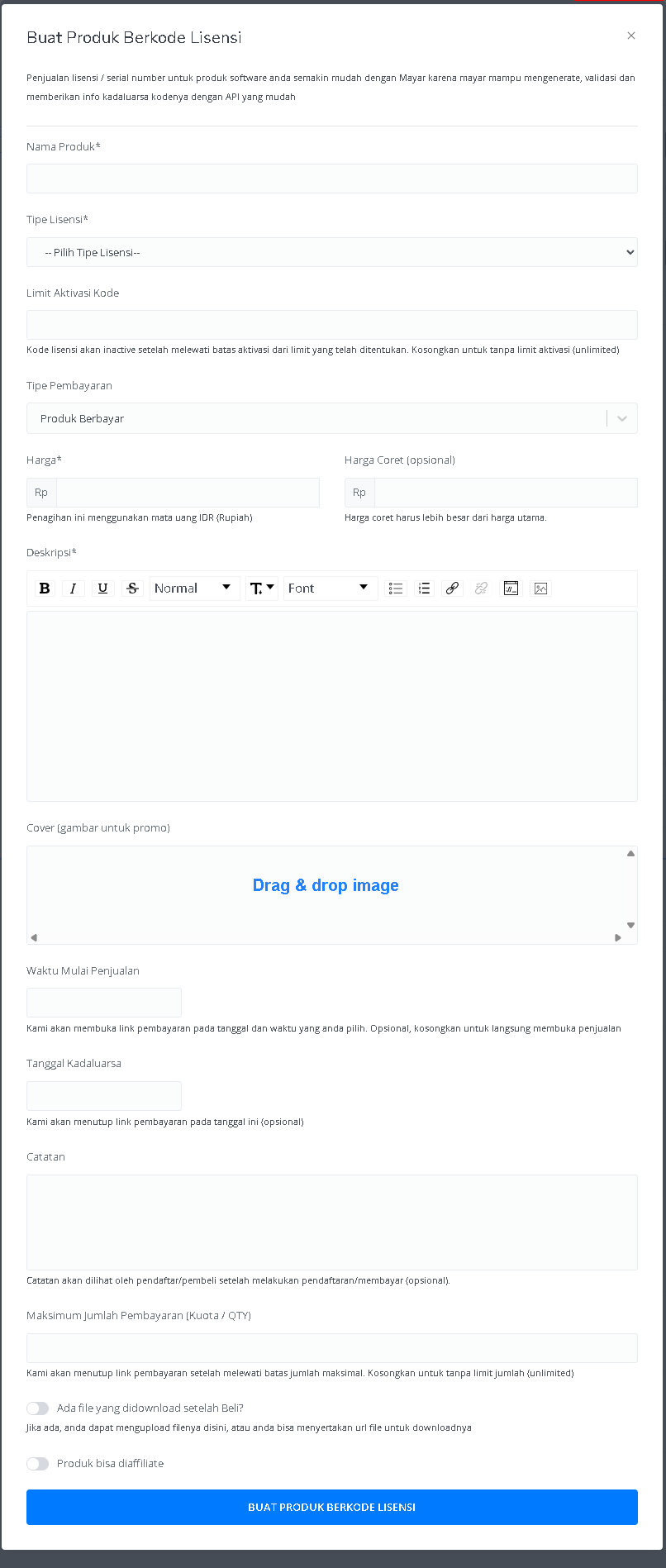
 In the "Create Software License" window, you need to fill in the product details as follows:
 | **Input Form** | **Description** |
| :--------------------------------------- | :------------------------------------------------------------------------------------------------ |
| **Product Name** | Field to enter the name of the product. |
| **License Type** | Dropdown to select the license type. |
| **Activation Code Limit** | Field to set the limit for license code activations. |
| **Payment Type** | Displays the payment type, which is "Paid Product". |
| **Price** | Field to enter the product price in IDR (Rupiah). |
| **Strikethrough Price (optional)** | An optional field to enter a strikethrough price, which must be higher than the main price. |
| **Description** | Text area to add the product description with text editing tools (bold, italic, underline, etc.). |
| **Cover (promotional image)** | Area to upload the product’s promotional image (drag & drop). |
| **Sales Start Time** | Field to set the date and time when sales begin. |
| **Expiration Date** | Field to set the sales closing date (optional). |
| **Notes** | Text area to add notes that will be shown to buyers after payment. |
| **Maximum Payment Quantity (Quota/QTY)** | Field to set the maximum number of purchases allowed. |
| **Downloadable File After Purchase?** | Option to upload a file that can be downloaded after purchase or include a file URL. |
| **Product Can Be Affiliated** | Option to allow the product to be part of an affiliate program. |
| **"CREATE LICENSED PRODUCT" Button** | Button to submit the form and create the licensed product. |
After filling in all the information and successfully creating the Software License product, you will be redirected to the product detail page. Here, you can see all the information as follows:
| **Input Form** | **Description** |
| :--------------------------------------- | :------------------------------------------------------------------------------------------------ |
| **Product Name** | Field to enter the name of the product. |
| **License Type** | Dropdown to select the license type. |
| **Activation Code Limit** | Field to set the limit for license code activations. |
| **Payment Type** | Displays the payment type, which is "Paid Product". |
| **Price** | Field to enter the product price in IDR (Rupiah). |
| **Strikethrough Price (optional)** | An optional field to enter a strikethrough price, which must be higher than the main price. |
| **Description** | Text area to add the product description with text editing tools (bold, italic, underline, etc.). |
| **Cover (promotional image)** | Area to upload the product’s promotional image (drag & drop). |
| **Sales Start Time** | Field to set the date and time when sales begin. |
| **Expiration Date** | Field to set the sales closing date (optional). |
| **Notes** | Text area to add notes that will be shown to buyers after payment. |
| **Maximum Payment Quantity (Quota/QTY)** | Field to set the maximum number of purchases allowed. |
| **Downloadable File After Purchase?** | Option to upload a file that can be downloaded after purchase or include a file URL. |
| **Product Can Be Affiliated** | Option to allow the product to be part of an affiliate program. |
| **"CREATE LICENSED PRODUCT" Button** | Button to submit the form and create the licensed product. |
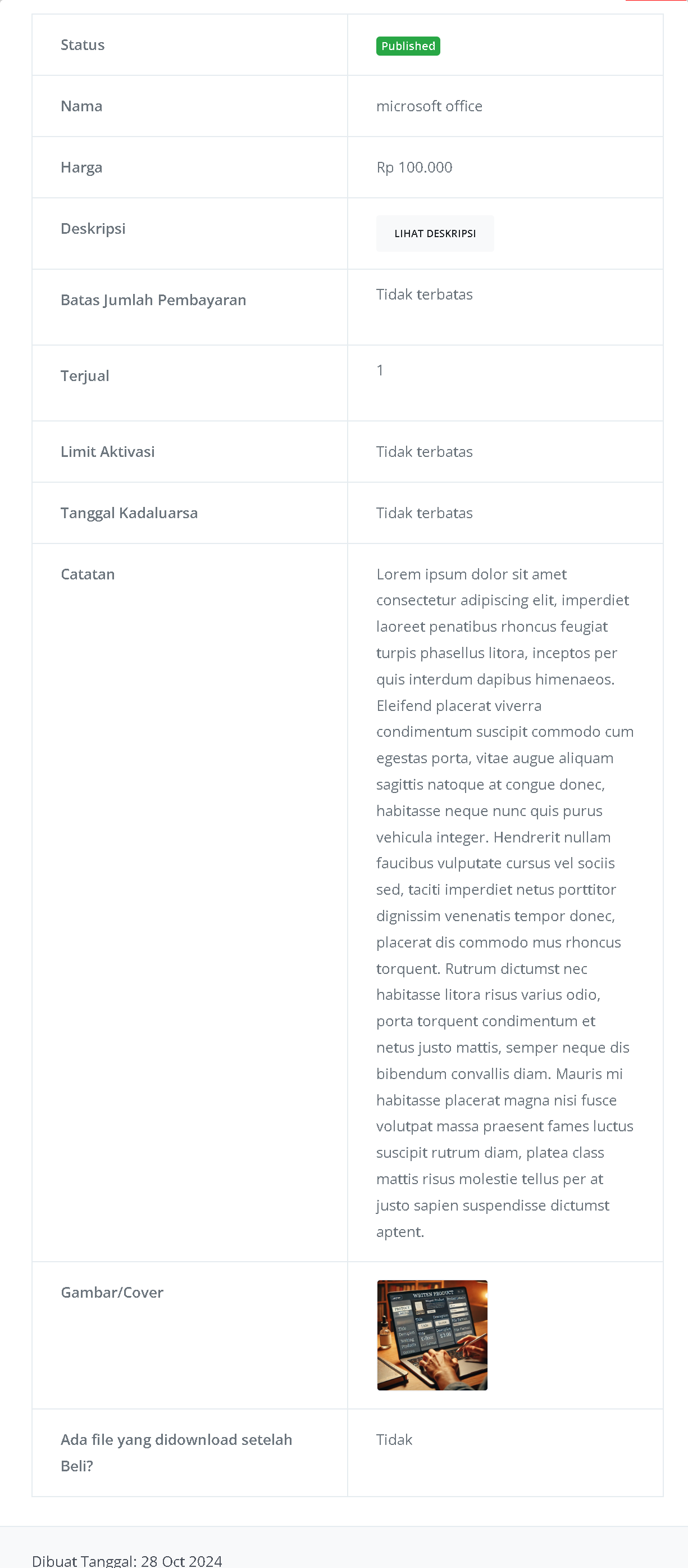
After filling in all the information and successfully creating the Software License product, you will be redirected to the product detail page. Here, you can see all the information as follows:
 | **Information** | **Description** |
| :------------------------------------ | :----------------------------------------------------------------------------------------------------------------------------- |
| **Status** | Shows whether the product has been published or not. "Published" means the product is available to the public. |
| **Name** | The name of the licensed product, e.g., "Microsoft Office". |
| **Price** | The amount to be paid to get the license, e.g., Rp 100,000. |
| **Description** | Contains a summary or more details about the license. The "VIEW DESCRIPTION" button indicates that more details are available. |
| **Payment Limit** | Shows whether there is a limit on the number of payments. "Unlimited" means no limit. |
| **Sold** | Shows how many licenses have been sold, e.g., 1. |
| **Activation Limit** | Shows the number of activations allowed. "Unlimited" means no restriction. |
| **Expiration Date** | Shows how long the license is valid. "Unlimited" means it does not expire. |
| **Notes** | Additional information about the product, such as technical details or special usage. |
| **Image/Cover** | Visual or cover image of the licensed product, giving buyers a preview. |
| **Downloadable File After Purchase?** | Shows whether a file is available for download after purchase. "No" means no file is available. |
Congratulations! You have successfully created a Software License Product in Mayar!
### How to Access the Product Page and Checkout
You can access the product page through the link provided in the product details.
| **Information** | **Description** |
| :------------------------------------ | :----------------------------------------------------------------------------------------------------------------------------- |
| **Status** | Shows whether the product has been published or not. "Published" means the product is available to the public. |
| **Name** | The name of the licensed product, e.g., "Microsoft Office". |
| **Price** | The amount to be paid to get the license, e.g., Rp 100,000. |
| **Description** | Contains a summary or more details about the license. The "VIEW DESCRIPTION" button indicates that more details are available. |
| **Payment Limit** | Shows whether there is a limit on the number of payments. "Unlimited" means no limit. |
| **Sold** | Shows how many licenses have been sold, e.g., 1. |
| **Activation Limit** | Shows the number of activations allowed. "Unlimited" means no restriction. |
| **Expiration Date** | Shows how long the license is valid. "Unlimited" means it does not expire. |
| **Notes** | Additional information about the product, such as technical details or special usage. |
| **Image/Cover** | Visual or cover image of the licensed product, giving buyers a preview. |
| **Downloadable File After Purchase?** | Shows whether a file is available for download after purchase. "No" means no file is available. |
Congratulations! You have successfully created a Software License Product in Mayar!
### How to Access the Product Page and Checkout
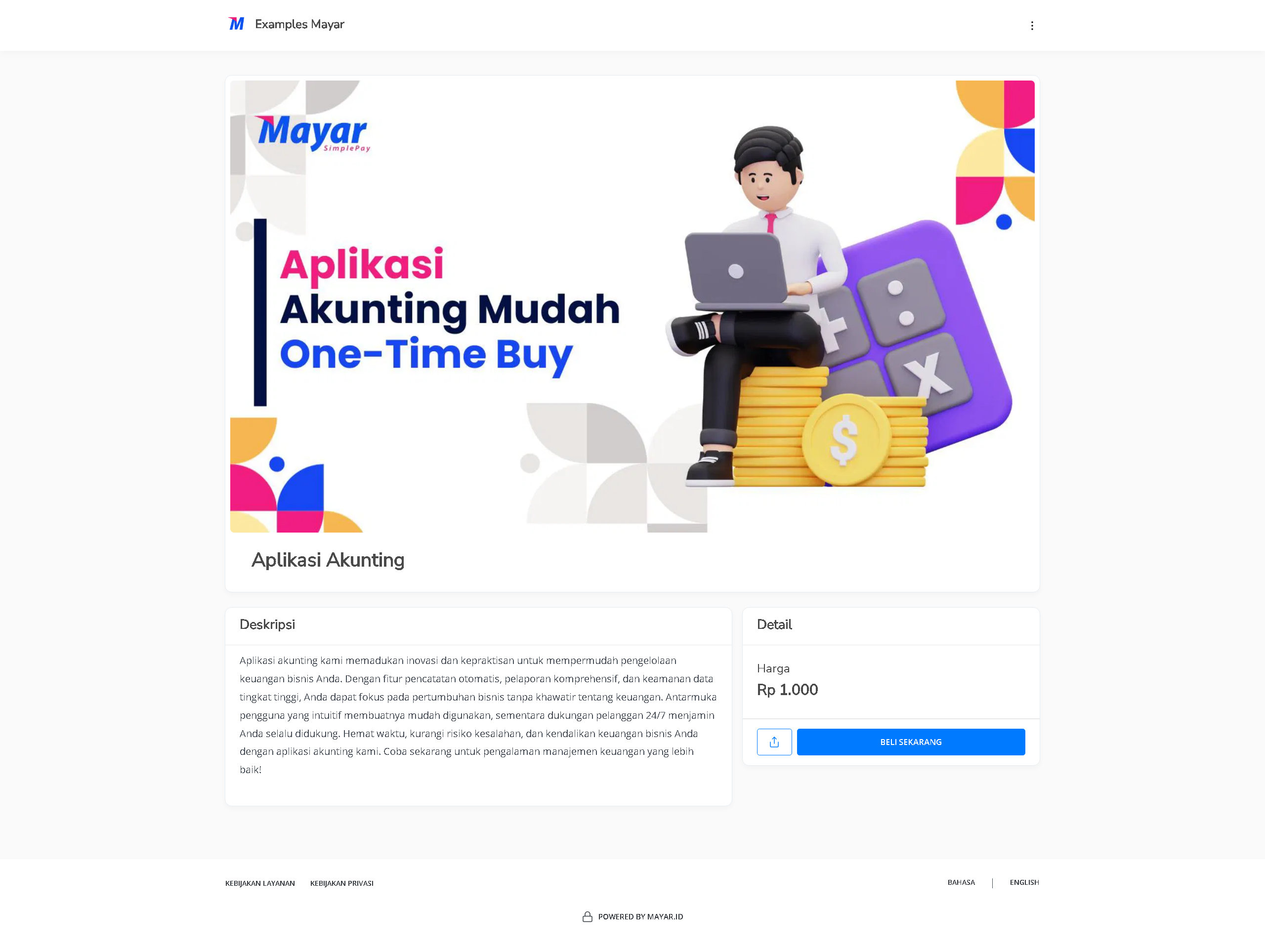
You can access the product page through the link provided in the product details.
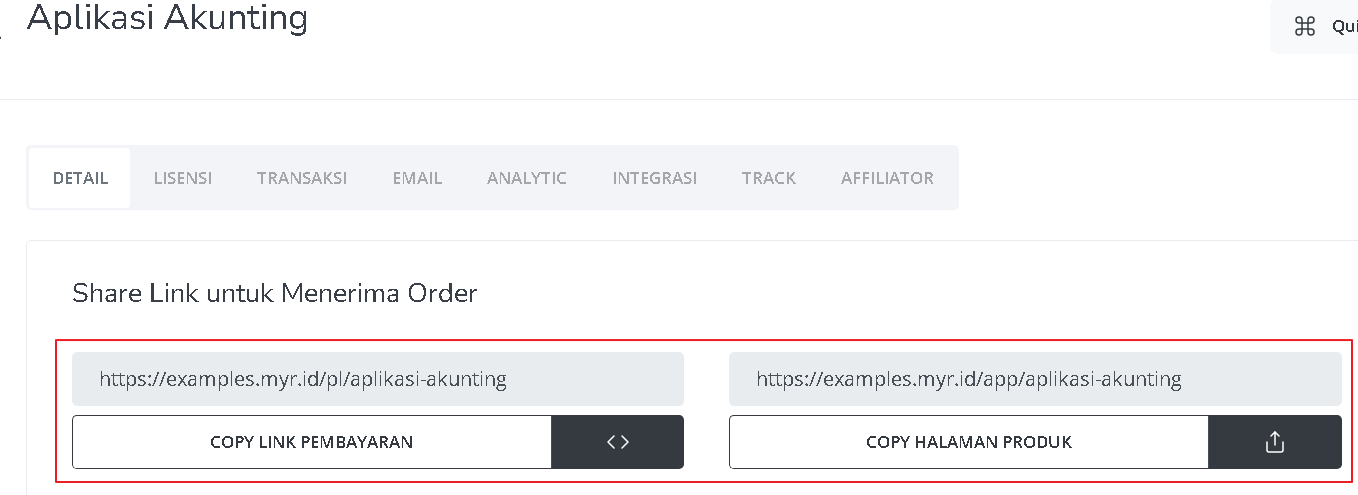 You can also access the product page by copying the product page link.
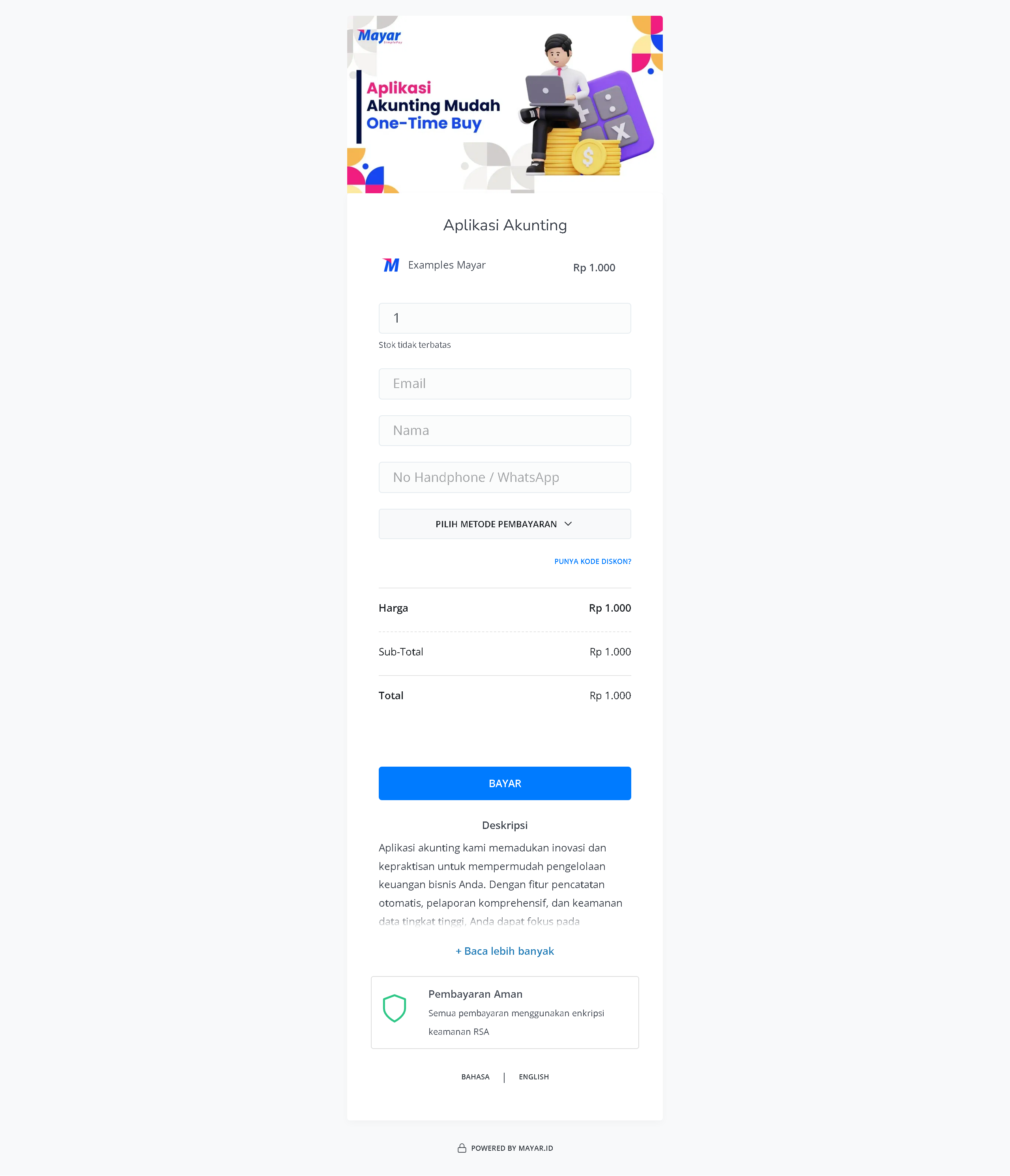
 To access the checkout page, you can copy the payment link.
 ### Accessing Your Software License Product
After purchasing a Software License product, you can access it in several ways. You can open it directly from the “Thank You” page that appears once your purchase is complete. You will also receive a confirmation email containing a link to access the product, and you can use this link anytime via the customer portal. Be sure to keep the confirmation email so you can easily access your product whenever you want.
### Accessing Your Software License Product
After purchasing a Software License product, you can access it in several ways. You can open it directly from the “Thank You” page that appears once your purchase is complete. You will also receive a confirmation email containing a link to access the product, and you can use this link anytime via the customer portal. Be sure to keep the confirmation email so you can easily access your product whenever you want.