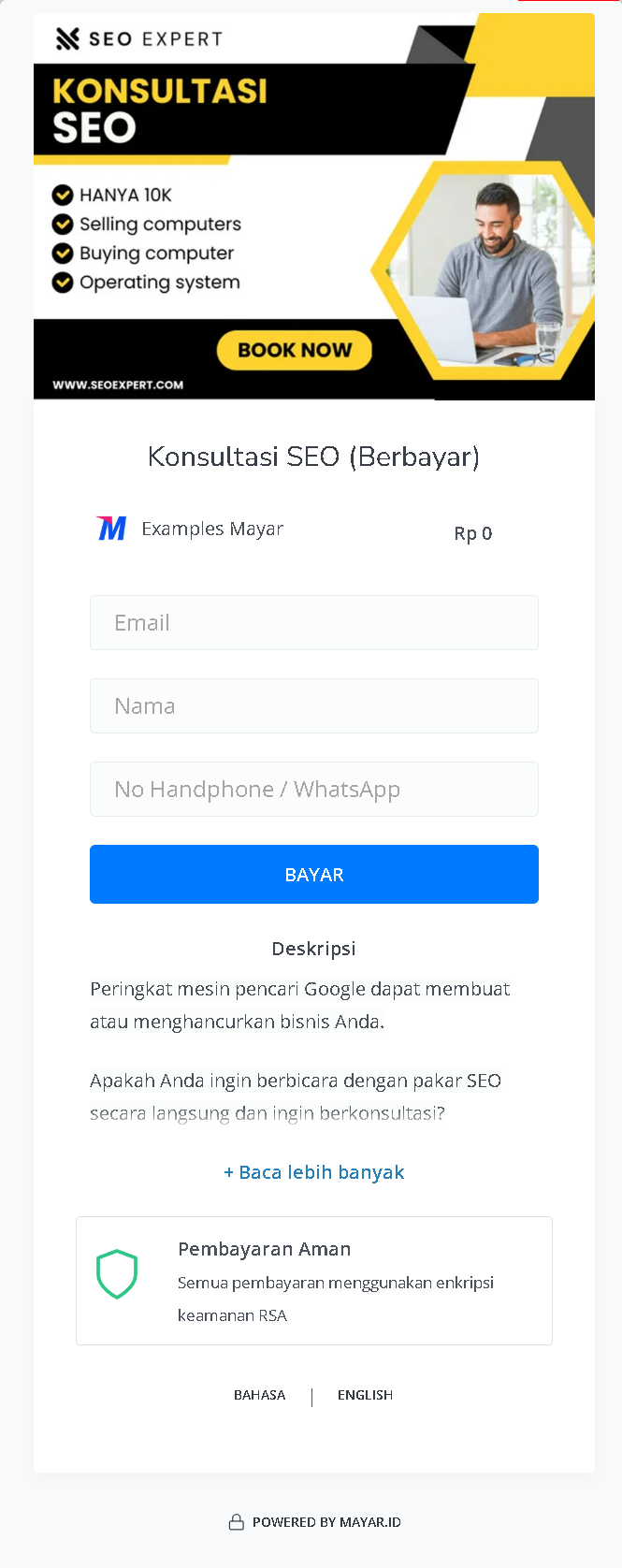
> ## Documentation Index
> Fetch the complete documentation index at: https://docs.mayar.id/llms.txt
> Use this file to discover all available pages before exploring further.
# Coaching & Mentoring
> Try to find your Passion and let the Coach & Mentor guide your Passion!
## Overview
Mayar Coaching & Mentoring is a dynamic online course platform that facilitates personalized one-on-one sessions across a diverse range of topics, making expert guidance more accessible to learners. This platform is designed to connect individuals with seasoned mentors, providing tailored coaching experiences that cater to specific learning and professional development needs.
With Mayar Coaching & Mentoring, users can effortlessly create and manage personalized mentoring sessions using the intuitive Mayar Web Apps. These applications offer robust tools for scheduling, content delivery, and interaction, ensuring that both mentors and mentees have a seamless and productive experience. The platform supports a variety of topics, allowing learners to engage with experts in fields that align with their personal and professional goals.
This documentation is dedicated to guiding users through the process of creating and customizing payment links via the Mayar Dashboard. By utilizing these tools, mentors can efficiently manage session bookings, process payments, and track financial transactions. The Mayar Dashboard offers extensive customization options, enabling mentors to tailor the payment process to suit their specific services and client needs. Through this comprehensive approach, Mayar Coaching & Mentoring empowers mentors to deliver impactful, personalized learning experiences while streamlining administrative tasks for maximum efficiency.
### Navigate to Coaching & Mentoring
Make sure you are logged into your account and on the main **Dashboard** Page. This is where you will start with the **Coaching & Mentoring**.
On the Dashboard page, find and click **Coaching & Mentoring** Menu. This will show all of the **Coaching & Mentoring** lists that you have created before.
### Create Coaching & Mentoring
Make sure you are logged into your Mayar account and on the main **Dashboard** page.
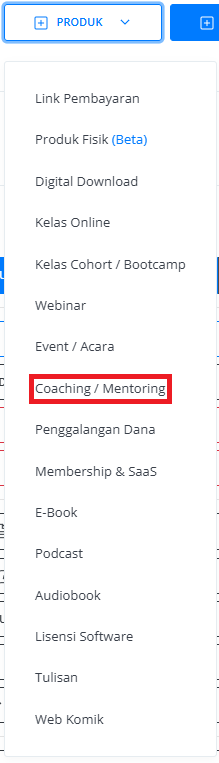
Click the “**Product**” button at the top right near the “**Create**” button. This will take you to the product menu.
Select the “**Coaching & Mentoring**” option to start creating your Writing product. The “**Create Coaching & Mentoring**” window will open.
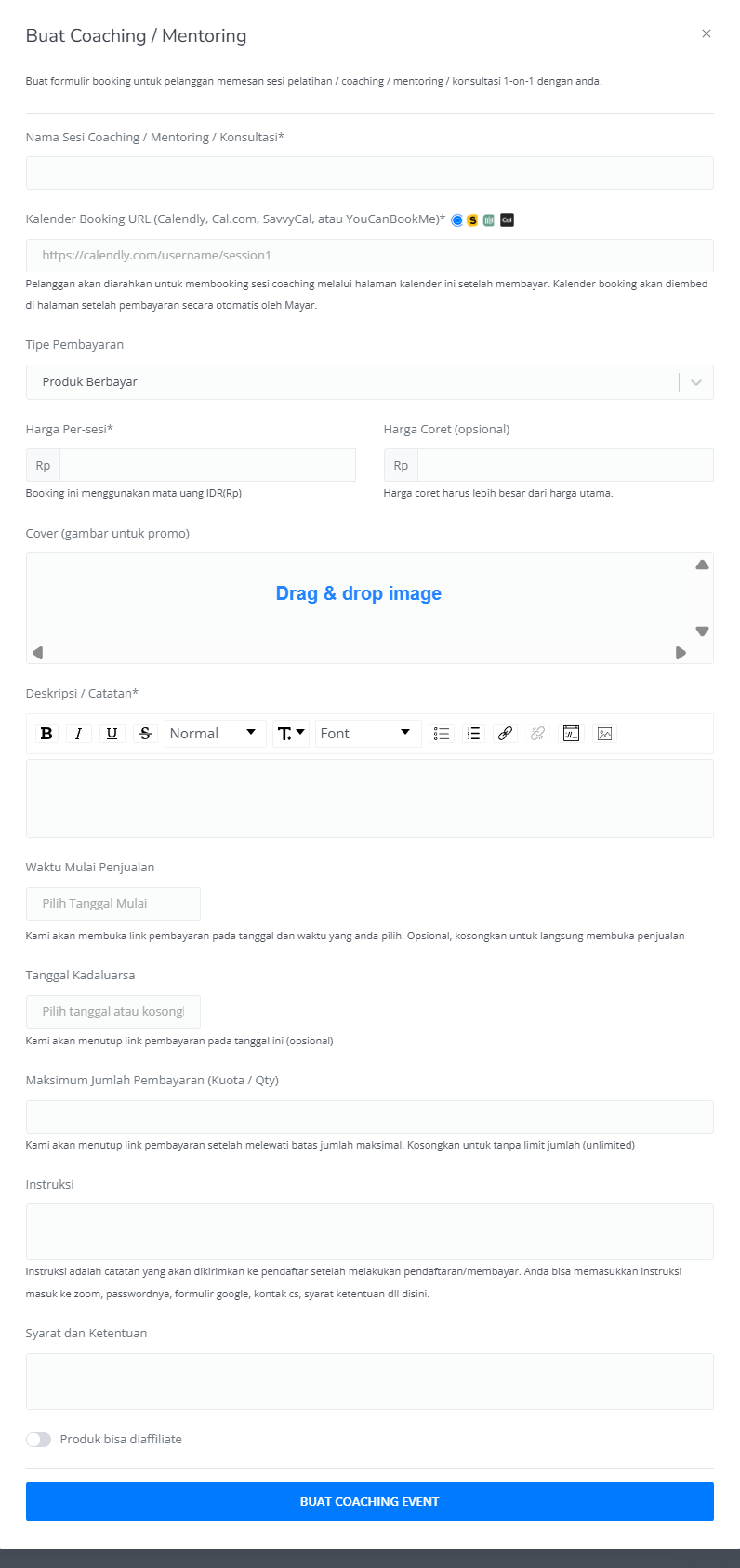
 Enter the following information:
| **Input Form** | **Description** |
| :--------------------------------------- | :------------------------------------------------------------------------------------------------------- |
| Name Coaching / Mentoring / Consultation | Name of Coaching & Mentoring Event. |
| Calendar URL/Link | Link for Coaching & Mentoring event. |
| Payment Type | Set up your Payment type. |
| Price per session | Price of Coaching & Mentoring event per session. |
| Strikethrough price | Price of the Webinar event before Discount (Optional). |
| Cover (Image for promotion) | Cover image of Coaching & Mentoring for Promotion. |
| Description | Description field for Coaching & Mentoring event. |
| Sales Start Time | Start time for the open Link Payment page. |
| Expired Date | Start time for the close Link Payment page (Optional). |
| Maximum payment amount (Quota/qty) | Set up the maximum quantity of product that can be sold (Optional). If empty, the qty will be unlimited. |
| Instruction | Guide for Coaching & Mentoring Event. |
| Terms & Condition | Terms & Conditions for Coaching & Mentoring event. |
| The product can be affiliated | Product can be affiliated by others (Optional) |
| Button Create Coaching Event | Button create Link Payment of Coaching & Mentoring Event. |
Enter the following information:
| **Input Form** | **Description** |
| :--------------------------------------- | :------------------------------------------------------------------------------------------------------- |
| Name Coaching / Mentoring / Consultation | Name of Coaching & Mentoring Event. |
| Calendar URL/Link | Link for Coaching & Mentoring event. |
| Payment Type | Set up your Payment type. |
| Price per session | Price of Coaching & Mentoring event per session. |
| Strikethrough price | Price of the Webinar event before Discount (Optional). |
| Cover (Image for promotion) | Cover image of Coaching & Mentoring for Promotion. |
| Description | Description field for Coaching & Mentoring event. |
| Sales Start Time | Start time for the open Link Payment page. |
| Expired Date | Start time for the close Link Payment page (Optional). |
| Maximum payment amount (Quota/qty) | Set up the maximum quantity of product that can be sold (Optional). If empty, the qty will be unlimited. |
| Instruction | Guide for Coaching & Mentoring Event. |
| Terms & Condition | Terms & Conditions for Coaching & Mentoring event. |
| The product can be affiliated | Product can be affiliated by others (Optional) |
| Button Create Coaching Event | Button create Link Payment of Coaching & Mentoring Event. |
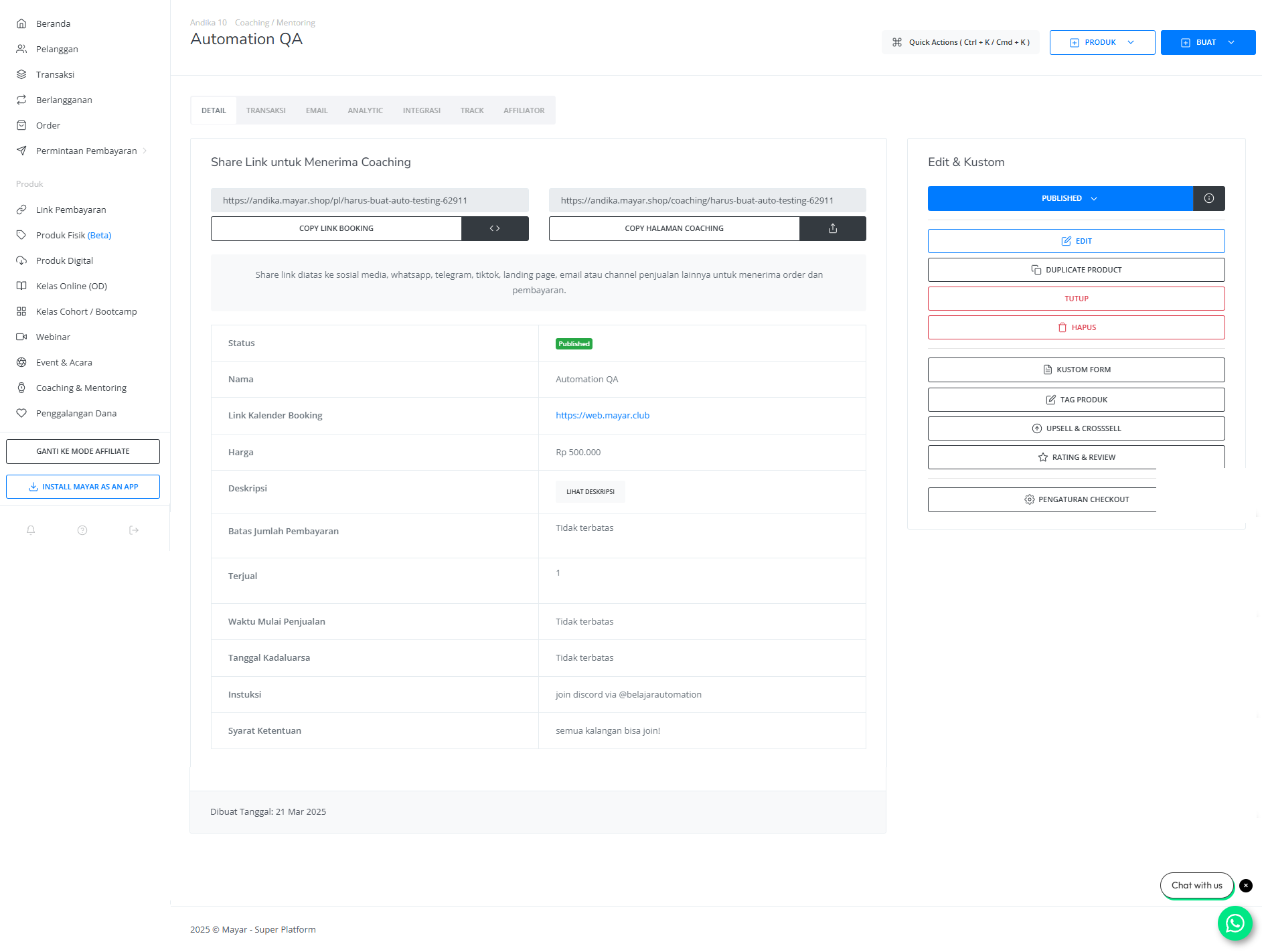
 After filling in all the information, review the product details to ensure everything is correct. On the product detail page, you will see the following:
| **Information** | **Description** |
| :-------------------- | :-------------------------------------------------------------- |
| Status | Status of Coaching & Mentoring: Check if active or deactivated. |
| Name | Name of Coaching & Mentoring event. |
| Calendar Link Booking | Link to Coaching & Mentoring event. |
| Price | Price of Coaching & Mentoring. |
| Description | Description field for Coaching & Mentoring. |
| Payment Amount Limit | Maximum payment for Coaching & Mentoring. |
| Sold | Amount member checkout Coaching & Mentoring event. |
| Sales Start Time | Start time for the open Link Payment page. |
| Expired Date | Start time for the close Link Payment page. |
| Instructions | Guide for Through Coaching & Mentoring. |
| Terms & Condition | Terms & Conditions for Coaching & Mentoring event. |
After filling in all the information, review the product details to ensure everything is correct. On the product detail page, you will see the following:
| **Information** | **Description** |
| :-------------------- | :-------------------------------------------------------------- |
| Status | Status of Coaching & Mentoring: Check if active or deactivated. |
| Name | Name of Coaching & Mentoring event. |
| Calendar Link Booking | Link to Coaching & Mentoring event. |
| Price | Price of Coaching & Mentoring. |
| Description | Description field for Coaching & Mentoring. |
| Payment Amount Limit | Maximum payment for Coaching & Mentoring. |
| Sold | Amount member checkout Coaching & Mentoring event. |
| Sales Start Time | Start time for the open Link Payment page. |
| Expired Date | Start time for the close Link Payment page. |
| Instructions | Guide for Through Coaching & Mentoring. |
| Terms & Condition | Terms & Conditions for Coaching & Mentoring event. |
 If everything looks good, congratulations — you have successfully created a **Coaching & Mentoring** on Mayar!
### How to Access the Product Page and Checkout
You can access the product page through the link provided in the **product details**.
If everything looks good, congratulations — you have successfully created a **Coaching & Mentoring** on Mayar!
### How to Access the Product Page and Checkout
You can access the product page through the link provided in the **product details**.
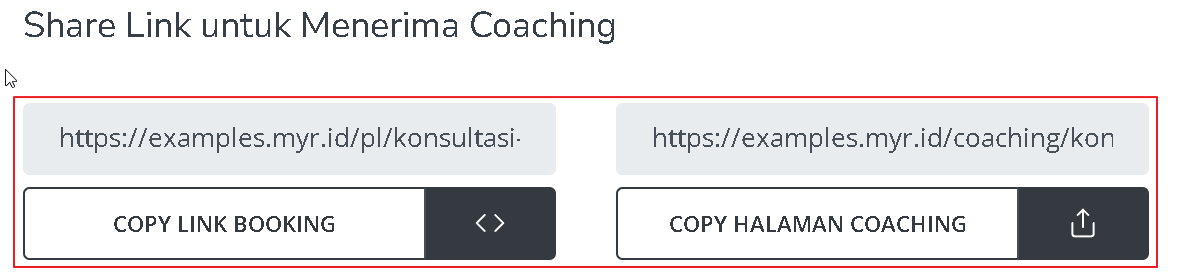 You can also access the product page by copying the **product page link**.
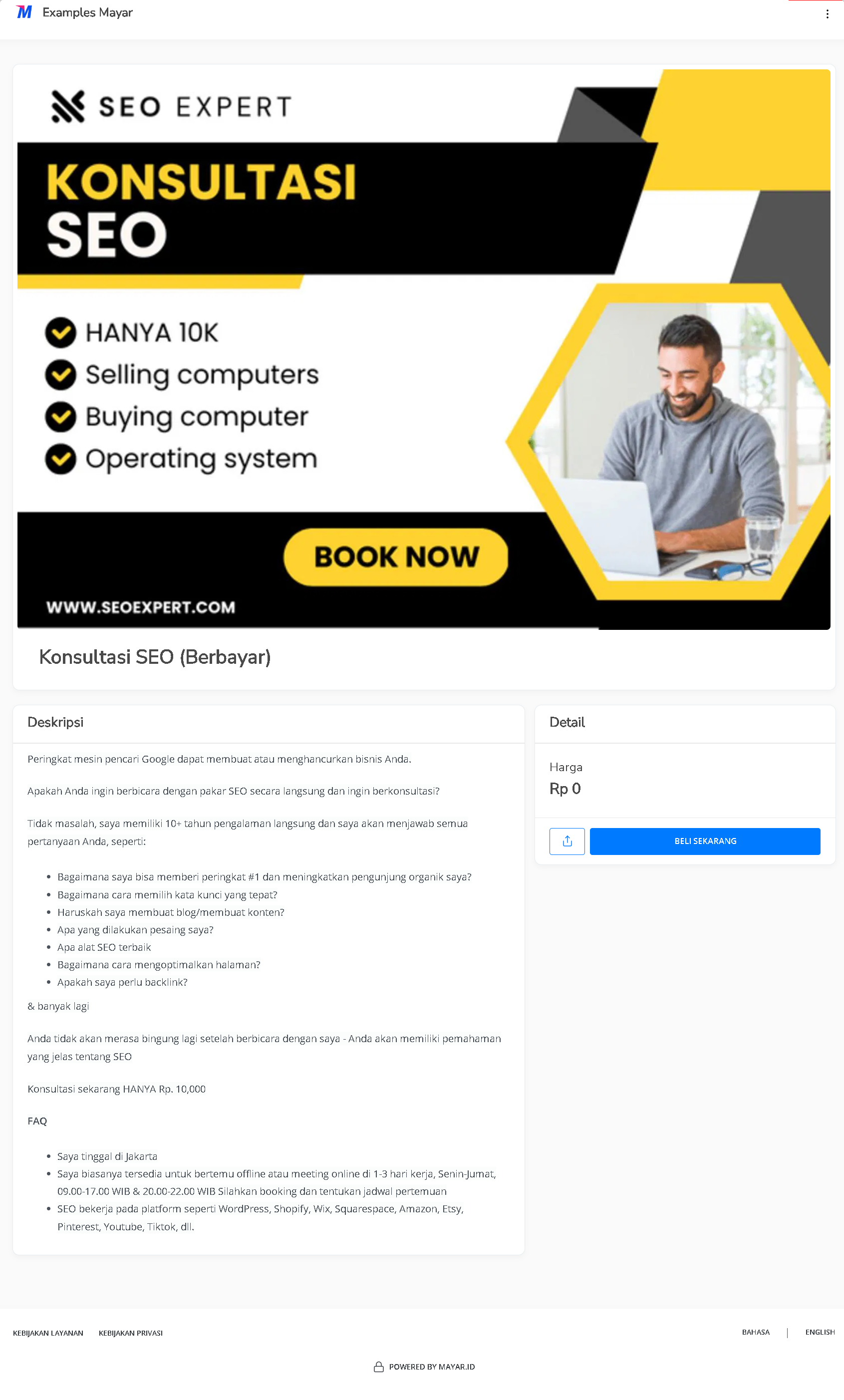 To access the checkout page, you can copy the **payment link**.